How payments work
Payments · Updated 23 November 2026 · 2 min read
Cash on delivery, bKash, Nagad and cards, and where the money goes.
Your customers choose how to pay at checkout. You decide which ways are offered. The money always goes to your own accounts. LaCommerce doesn't hold it or take a cut.
| Way to pay | Where the money goes | Turn it on in |
|---|---|---|
| Cash on delivery | The courier collects it and pays you | Settings › Checkout |
| bKash | Your bKash merchant account | Settings › Payment › bKash |
| Nagad | Your Nagad merchant account | Settings › Payment › Nagad |
| Cards and mobile banking (SSLCommerz) | Your SSLCommerz merchant account | Settings › Payment › SSLCommerz |
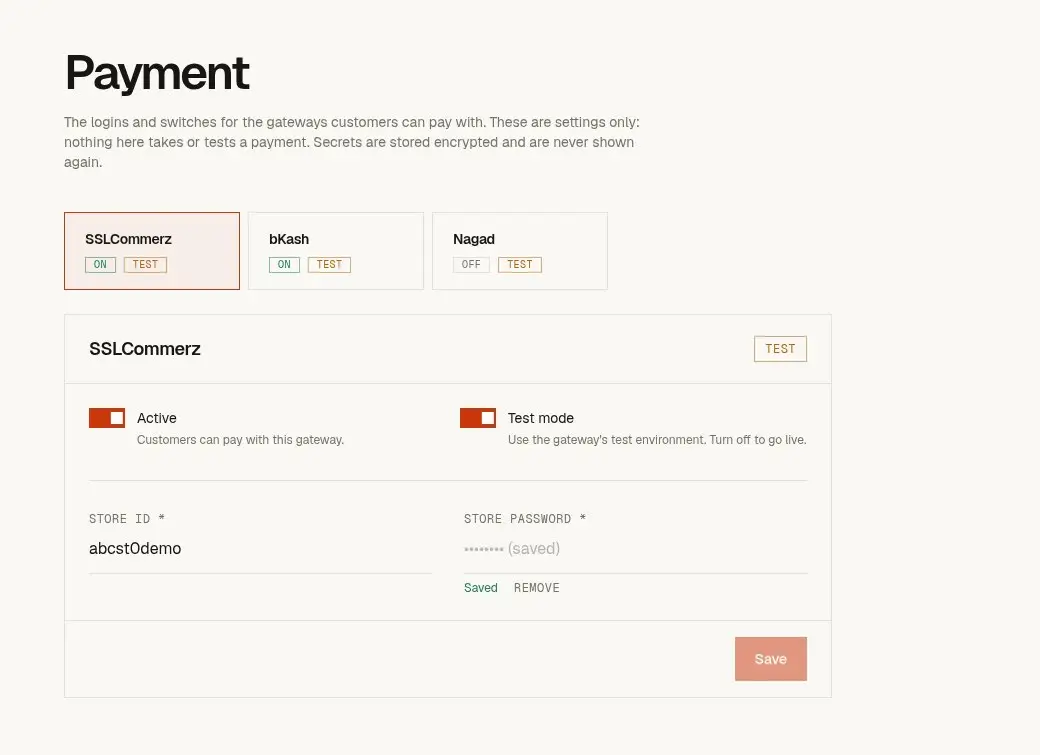
How an online payment works
The customer picks bKash, Nagad or SSLCommerz at checkout and pays on the gateway's page.
The payment shows on the order in Orders, and the order's payment status changes to Paid.
The gateway pays the money into your merchant account on its own schedule.
Unpaid online orders
If a customer starts an online payment but doesn't finish, the order waits. The stock stays held until Cancel unpaid orders after (days) in Settings › Checkout (1 to 30 days), then the order is cancelled.
Payment status on an order
| Status | Means |
|---|---|
| Unpaid | Nothing received yet |
| Partly paid | Some of the total received |
| Paid | The whole total received |
| Partly refunded / Refunded | Some or all of it given back |
Money that came in another way (cash at the shop, a bank transfer) can be added by hand with Record payment on the order.
Tip: Keep cash on delivery on as well as an online gateway. Many buyers in Bangladesh still prefer it.