Open your store in three steps
Getting started · Updated 23 November 2026 · 2 min read
Pick a plan, name your store and choose a theme. It goes live on your free address.
Opening a store takes three steps: a plan, a name and a theme. Your store goes live on a free address straight away, and you can add products, payments and delivery after that.
Before you start
Sign up at LaCommerce and verify your email. If you choose a paid plan, top up your balance first. The first month (or year) is paid from it when the store is created. See Top up your balance.
Create the store
After you sign in, you see Your stores. Select + New store.
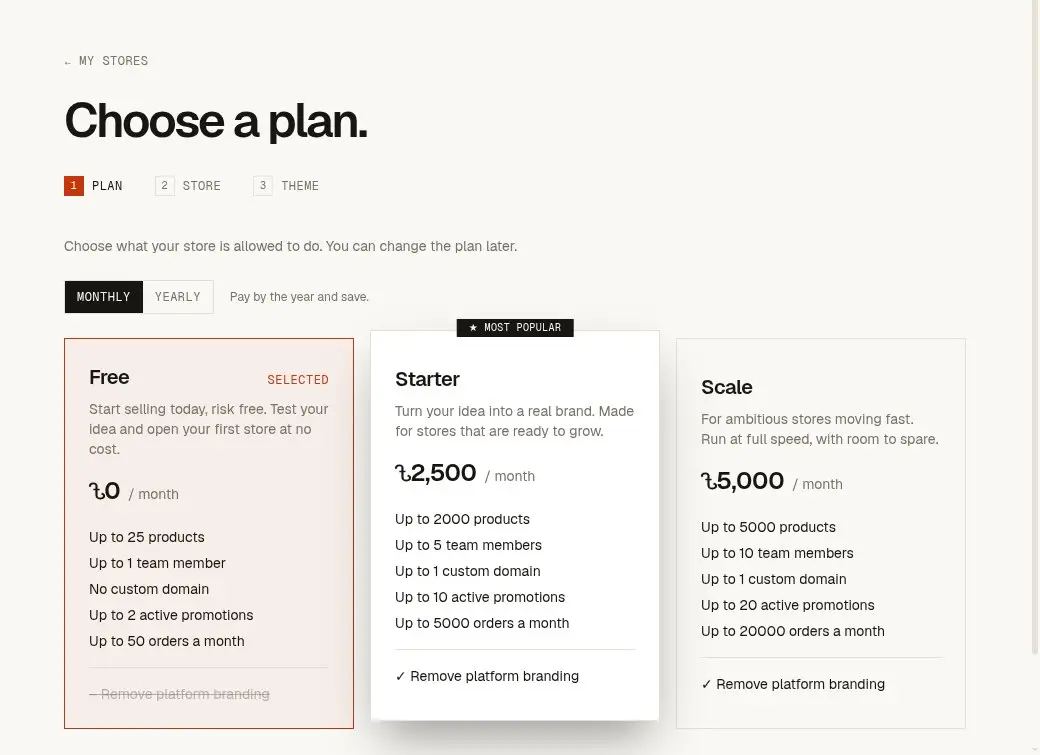
- Choose a plan. Pick Monthly or Yearly (yearly costs less), then choose a plan and select Continue →. You can change the plan later.
- Name your store. Type the Store name. The address under it is your free store address. Leave it empty to make it from the name, or type your own (lowercase letters, digits and dashes). Select Create store →.
- Pick a theme. Choose the look of your storefront, then select Open my dashboard →. You can change the theme any time.
What to do next
Your dashboard opens with the Finish setting up your store checklist at the top. Work through it from left to right: add a product, set delivery rates, choose how customers pay, upload your logo, set up email and connect your domain.
Tip: The free plan is enough to try everything with a few products. Upgrading later keeps all your products, orders and settings.
Common questions
Can I change my store's address later?
Your free address stays as it is, but you can connect your own domain at any time and make it the main address. See Connect a domain you own.
How many stores can I open?
Up to 3 stores of your own on one account. Each store has its own plan. See Run several stores.
What if my balance is too low for the plan?
The store can't be created on a paid plan until the balance covers the first period. Pick the free plan now and upgrade later, or top up first.