Add the Meta pixel
Marketing, SEO and social · Updated 23 November 2026 · 1 min read
Track visits and orders from your Facebook and Instagram ads.
The Meta (Facebook) pixel tells Facebook which visitors viewed a product, started checkout and bought, so your ads reach the right people and you can see which ads bring orders. You only paste the pixel ID. The store adds the code for you.
Add the pixel
In Meta Events Manager, open your pixel and copy its ID (a long number).
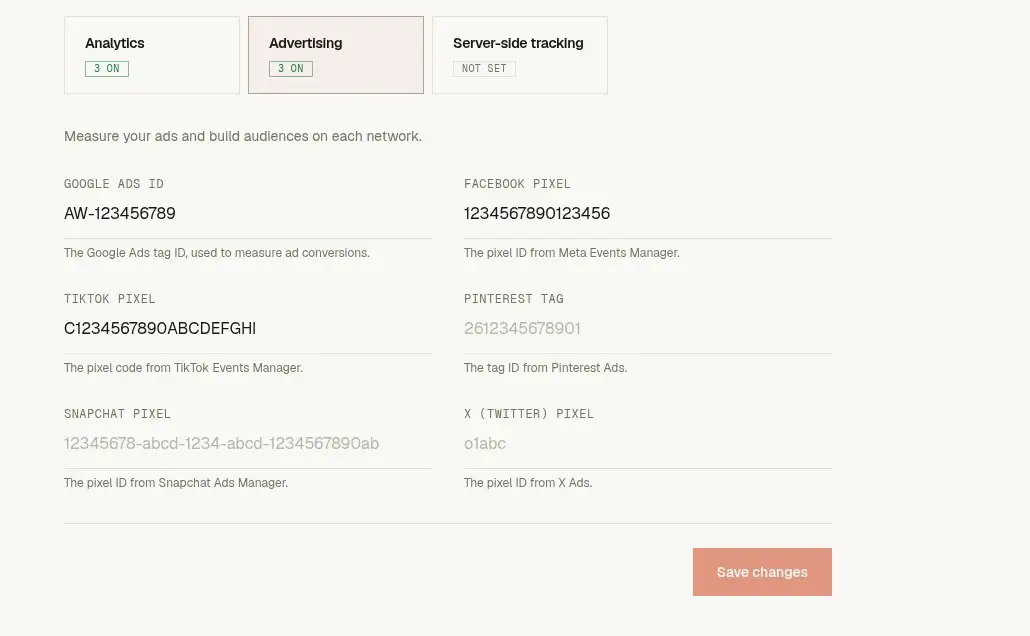
In LaCommerce, go to Settings › Tracking and open Advertising.
Paste it in Facebook pixel. Paste only the ID, not the whole code.
Select Save changes.
Events your store sends
| When | Event |
|---|---|
| A product page or landing page opens | ViewContent |
| Checkout starts | InitiateCheckout |
| An order is placed | Purchase (with the total) |
Make it more accurate
Ad blockers hide some browser events. Under Server-side tracking, paste a Facebook Conversions API token (from Meta Events Manager › Settings › Conversions API). Your store then also sends purchases from its own server.
Other networks
The same screen takes Google Ads, TikTok, Pinterest, Snapchat and X pixels, and under Analytics, Google Tag Manager, Google Analytics and Microsoft Clarity.