Loyalty coins
Customers and reviews · Updated 23 November 2026 · 2 min read
Reward buyers with coins they spend on their next order.
With loyalty on, signed-in customers earn coins on delivered orders and spend them as a discount next time. You choose what they're called and what they're worth.
Turn it on
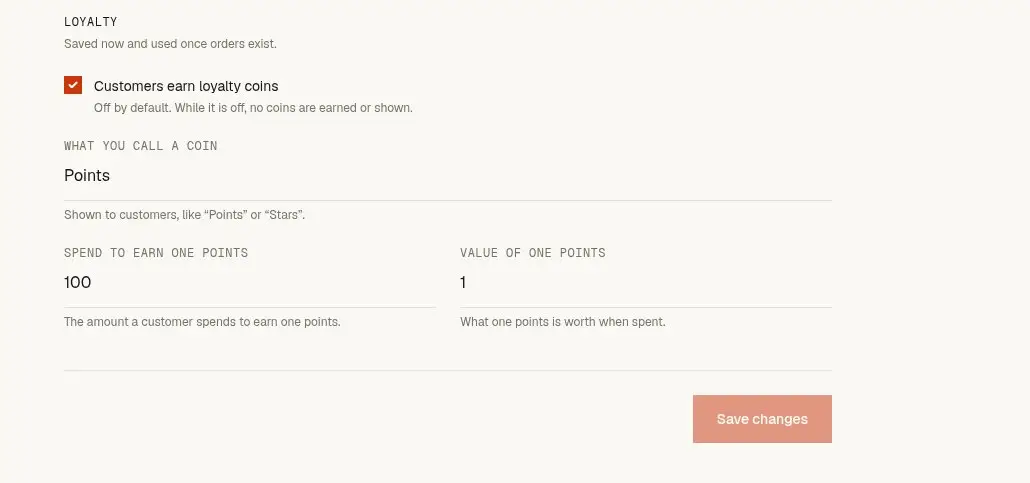
Go to Settings › Basic and scroll to Loyalty.
Tick Customers earn loyalty coins.
- What you call a coin: for example "Points" or "Stars".
Set how much a customer spends to earn one, and what one is worth when spent. For example: spend ৳100 to earn 1 point, and 1 point is worth ৳1.
Select Save changes.
How coins work
- Coins are earned when an order is delivered, on the items' price after the coupon.
- Customers spend them at checkout. Your team can also use them at the POS.
- Cancelling an order gives back coins that were spent on it.
Give or take coins by hand
Open the customer, find their coins and select Adjust. Choose + Add or − Take away, type the amount and a reason, like "Apology for a late delivery". Every change is in their coin history.
Turning it off
While loyalty is off, no coins are earned or shown, but every customer's balance is kept for when you turn it on again.